
Documentation · v1.6.0-beta.1
OwlASO docs
Install OwlASO, research keywords, track your rankings and dig through reviews — plus exactly how every number is computed.
Overview
OwlASO is a free, open-source desktop app for ASO keyword research and app store review monitoring across Google Play and the App Store. It can also run as a local web app in your browser.
- Keywords — popularity, difficulty and opportunity scores, the apps ranking for a keyword, similar keywords, and the keywords competitors also rank for.
- All countries — one keyword in all 20 storefronts at once, best markets first.
- Rank tracking — the position of your app for every keyword on each store, with a daily history.
- Reviews — both stores in one table, instant filtering, and comparison of up to 5 apps.
- Full data — every reachable review across stores and languages in an explorer: facets, search, sorting, and what users complain about.
- Export — CSV for everything, JSON for full-data results.
- Guidance — a one-minute guided tour, help tooltips and one-time tips.
Scores are estimates built from public store data — not Apple Search Ads’ first-party popularity. They’re most useful for comparing keywords with each other. See Metrics.
All countries, the Full data explorer and the guided tour arrived after the 1.6.0-beta.1 Windows installer. Run from source to use them now.
Install
Windows installer
- Open the latest release on GitHub.
- Download
OwlASO.Setup.<version>.exe(x64). A portableowlaso-unpacked-windows.zipis attached too if you’d rather not install. - Run the installer. You can choose the install folder; it adds desktop and Start-menu shortcuts.
If Windows shows “Windows protected your PC”, choose More info → Run anyway — or build the installer yourself from source (below).
From source (macOS, Linux, Windows)
You need Node.js 22.12 or newer, git, and internet access from the machine running the app.
git clone https://github.com/owlaso/owlaso.git
cd owlaso
npm install
npm run electron
Prefer your browser? Run the same app as a local web server instead:
npm start      # http://localhost:3000
npm run dev    # same, restarts when files change
Build your own installer
npm run dist:win     # Windows NSIS installer (x64)
npm run dist:mac     # macOS DMG (arm64 + x64)
npm run dist:linux   # Linux AppImage
Installers land in dist/. Build the macOS DMG on a Mac.
Quick start
Prefer a walkthrough? Press ? in the app for a one-minute guided tour. Or follow these four steps:
- Add an app. Click + in the sidebar (or press A) and search by name, Google Play package (
com.spotify.music) or App Store id (324684580). Apps found on both stores are merged into one entry. - Analyze a keyword. On the Keywords tab, type a keyword and press Enter. OwlASO scores it plus 5 similar keywords, and the Position column shows where your selected app ranks on each store.
- Read reviews. Switch to the Reviews tab with an app selected. Type words to filter (all of them must match) and pick a star range — filtering is instant.
- Export. Press Ctrl/⌘+E to export what you’re looking at as CSV.
Re-analyze your important keywords every few days. Each analysis adds that day’s snapshot, and trend arrows and charts appear from the second day on.
Tracking apps
The sidebar holds the apps you care about — yours and your competitors’.
- Add — click + or press A. The dialog searches both stores by default; you can limit it to one. Search by name, package name or App Store id.
- Merged entries — an app published on both stores becomes one entry. OwlASO pairs listings by title and developer and only accepts a confident match, so unrelated apps are never merged.
- Select — click an app to make it the active one. It drives the Position column and the Reviews tab.
- Compare — Ctrl/⌘-click to select up to 5 apps; their reviews are merged into one table.
- Folders — create one with the folder button, drag apps in and out, rename it, or delete it (its apps move back to the main list).
- Remove — focus an app and press Delete or Backspace. Removals and folder deletes can be undone from the notification.
Keywords
Type a keyword (2–100 characters) on the Keywords tab and press Enter. Use the toolbar to pick the store (All stores, Google Play or App Store) and the country.
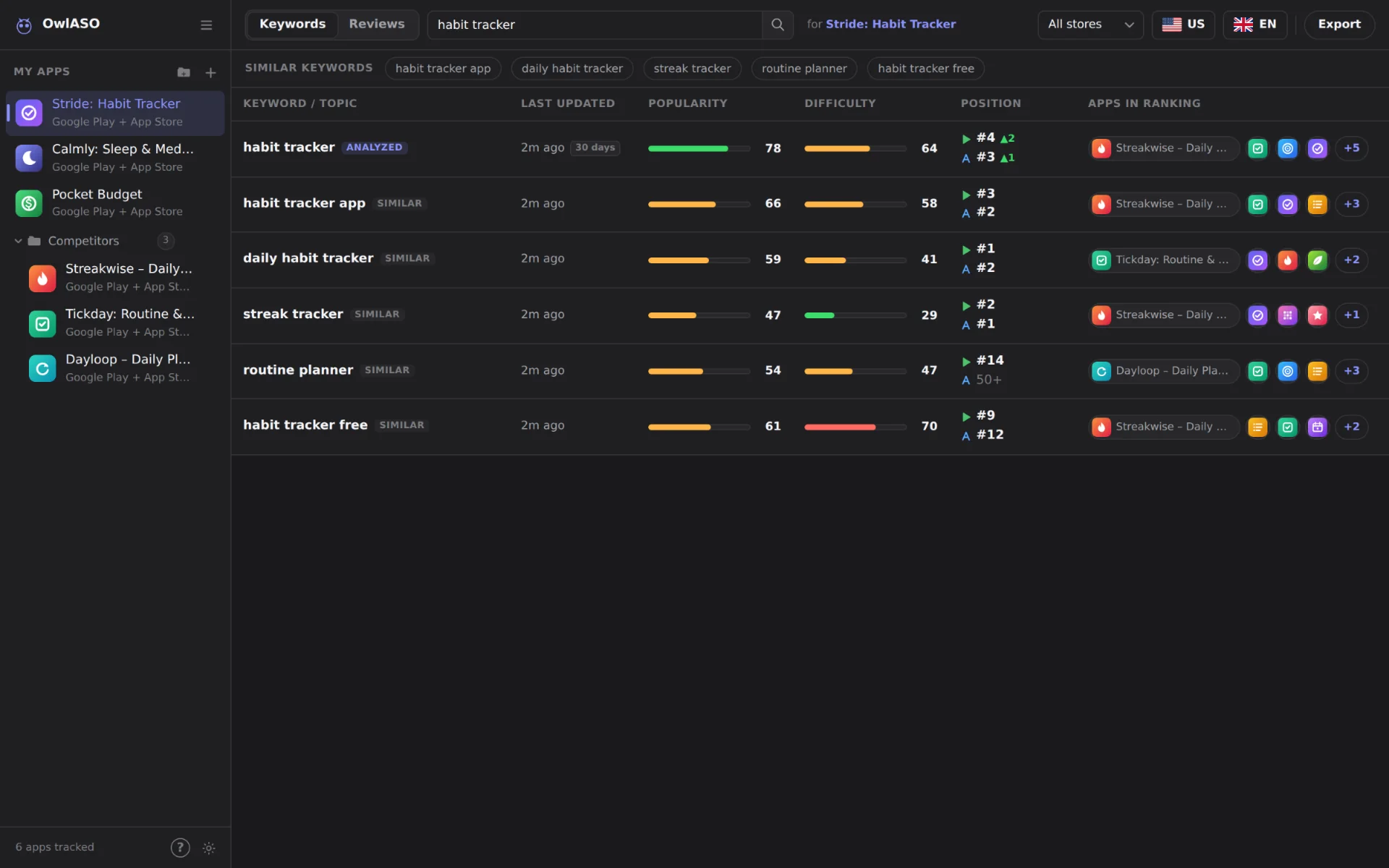
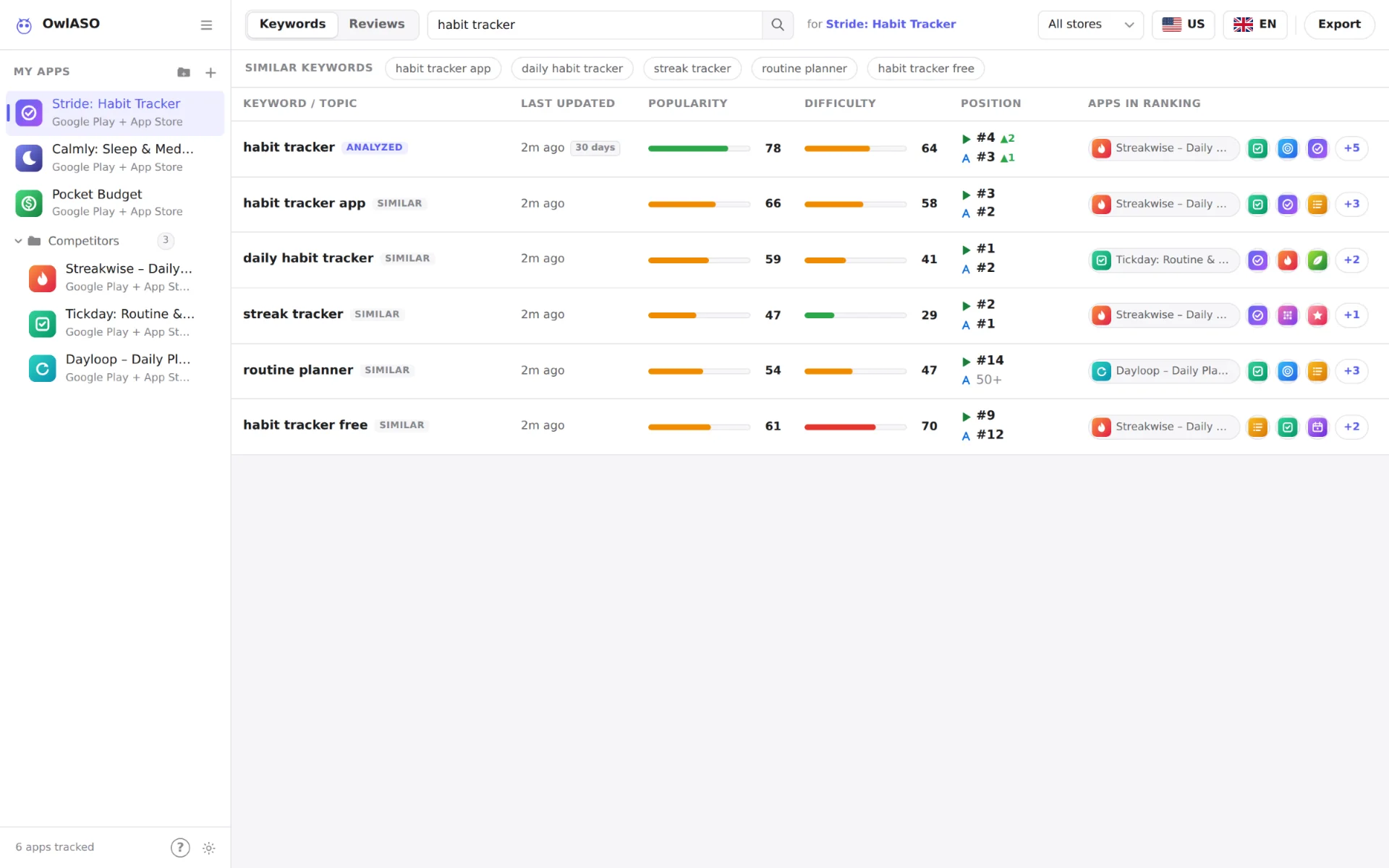
| Column | What it shows |
|---|---|
| Keyword / Topic | The analyzed keyword, followed by 5 similar keywords. |
| Last Updated | When the row was analyzed (hover for the exact time). |
| Popularity | Demand estimate, 0–100. |
| Difficulty | Competition estimate, 0–100. |
| Position | Rank of the app selected in the sidebar on each store: #1–#50, or 50+ when it isn’t in the top 50. Arrows (▲/▼) show the change since the previous snapshot. |
| Apps in Ranking | The top apps for the keyword. Click to see them all. |
- Similar keywords appear as chips above the table; click one to analyze it. When the table is empty, your recent keywords are one click away.
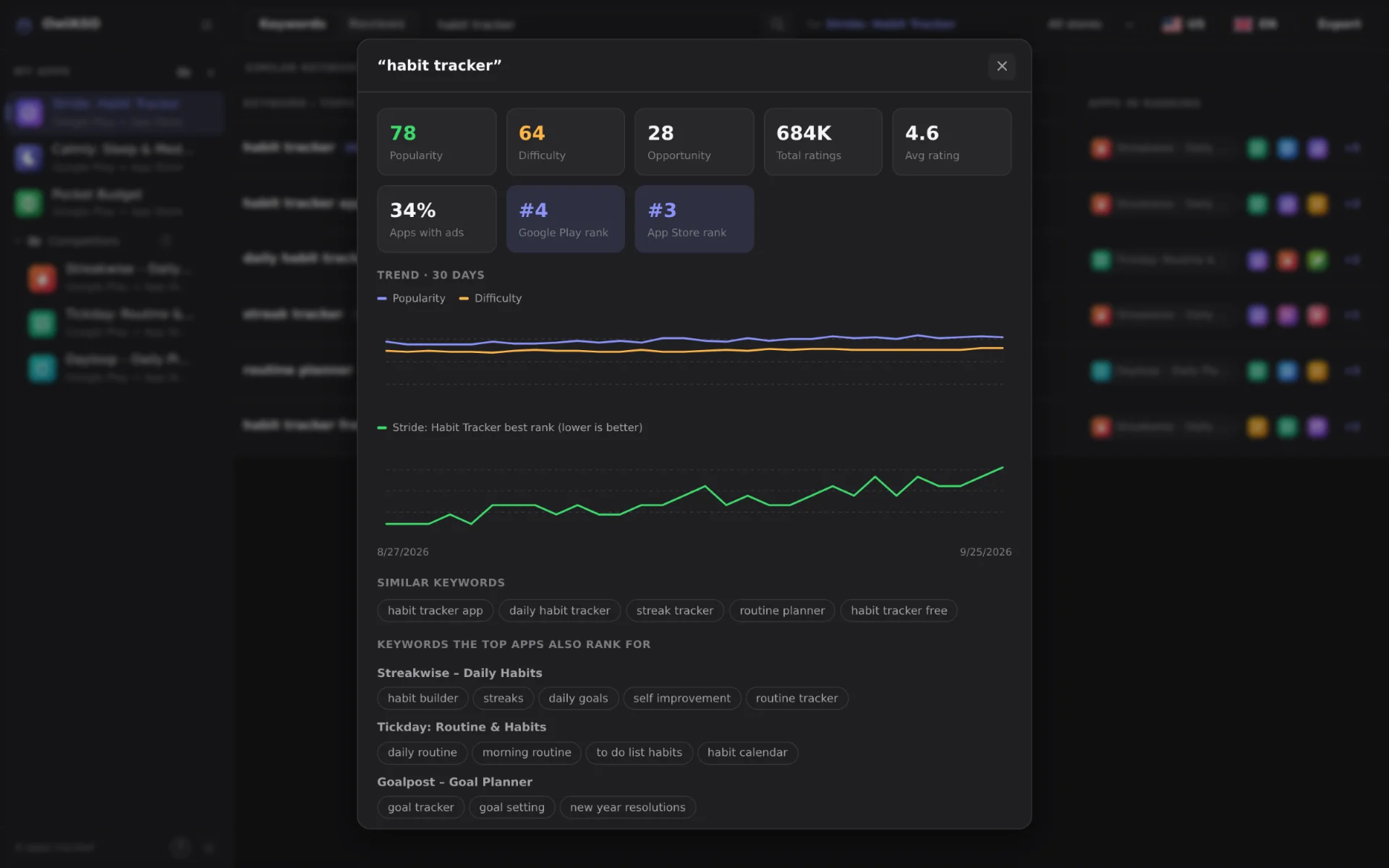
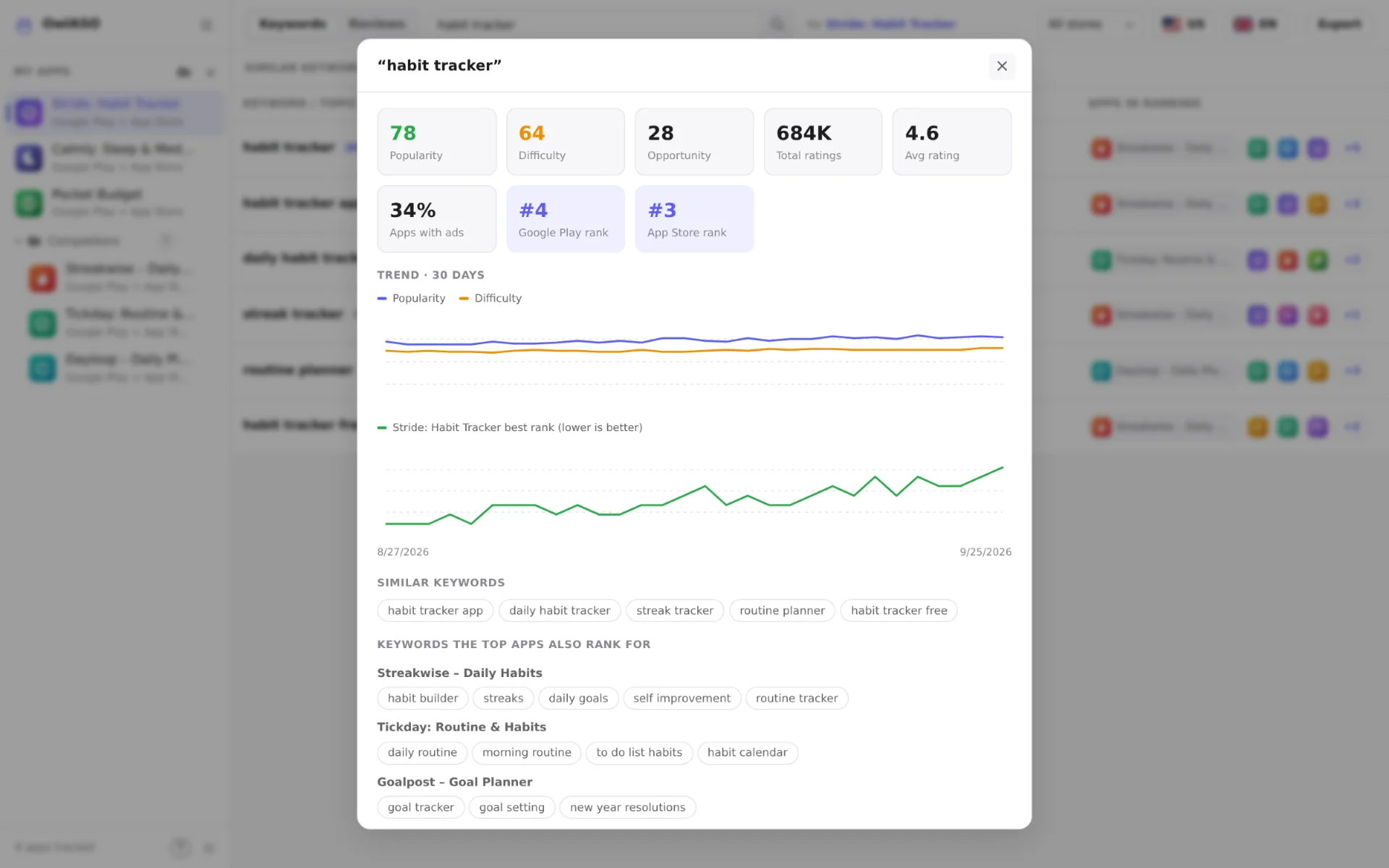
- Details — click a row to open its numbers, trend charts (popularity, difficulty and your app’s best rank), the ranking apps on each store (rating, ratings count, installs or price, ad flags) and the keywords those apps also rank for.
- Quick vs full analysis — similar-keyword rows get a quick analysis. Choose Run full analysis in their details to record history and find competitor keywords.
- Language — keyword searches need one language. With All langs selected, OwlASO uses the storefront’s main language (for example
dein Germany).
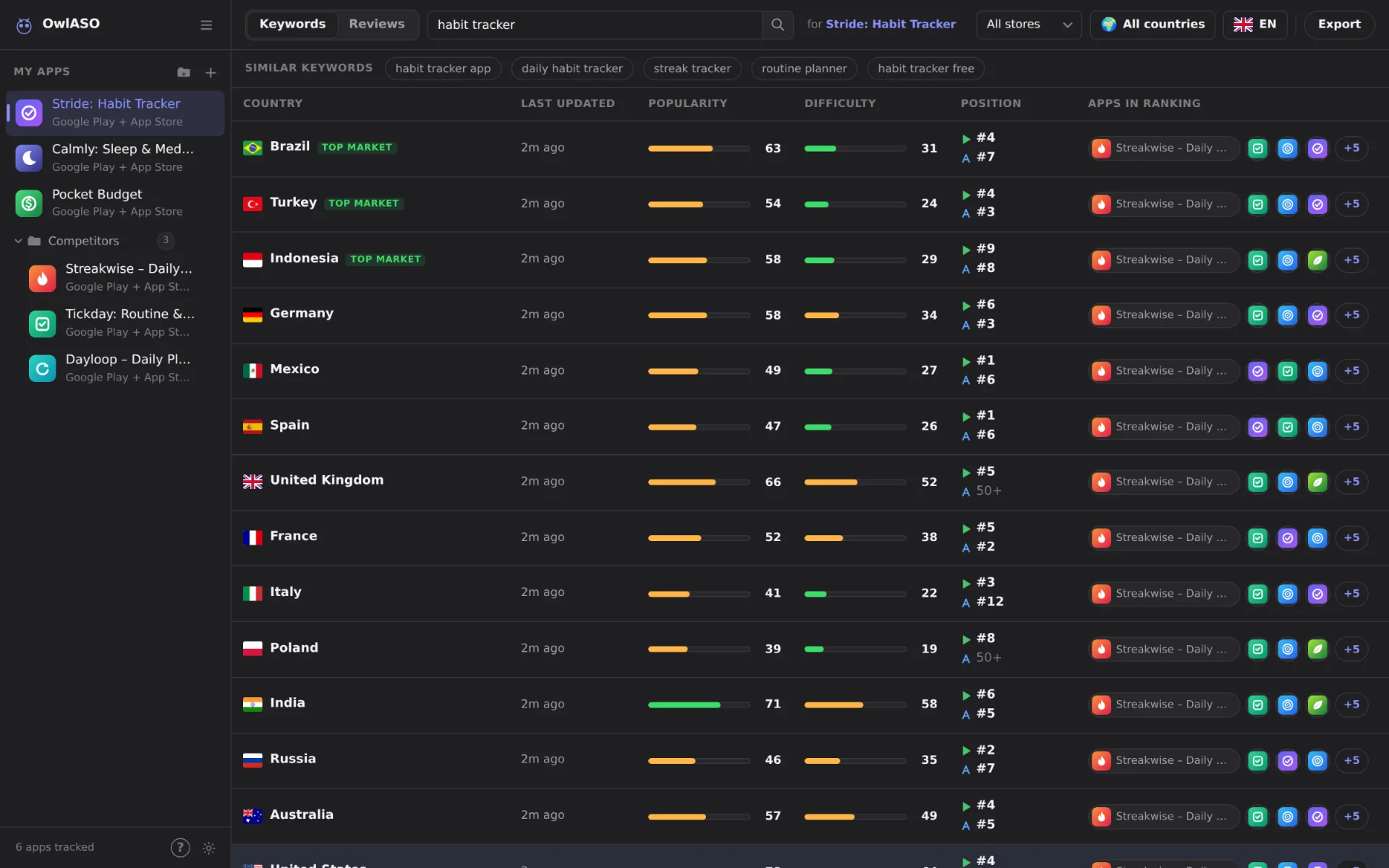
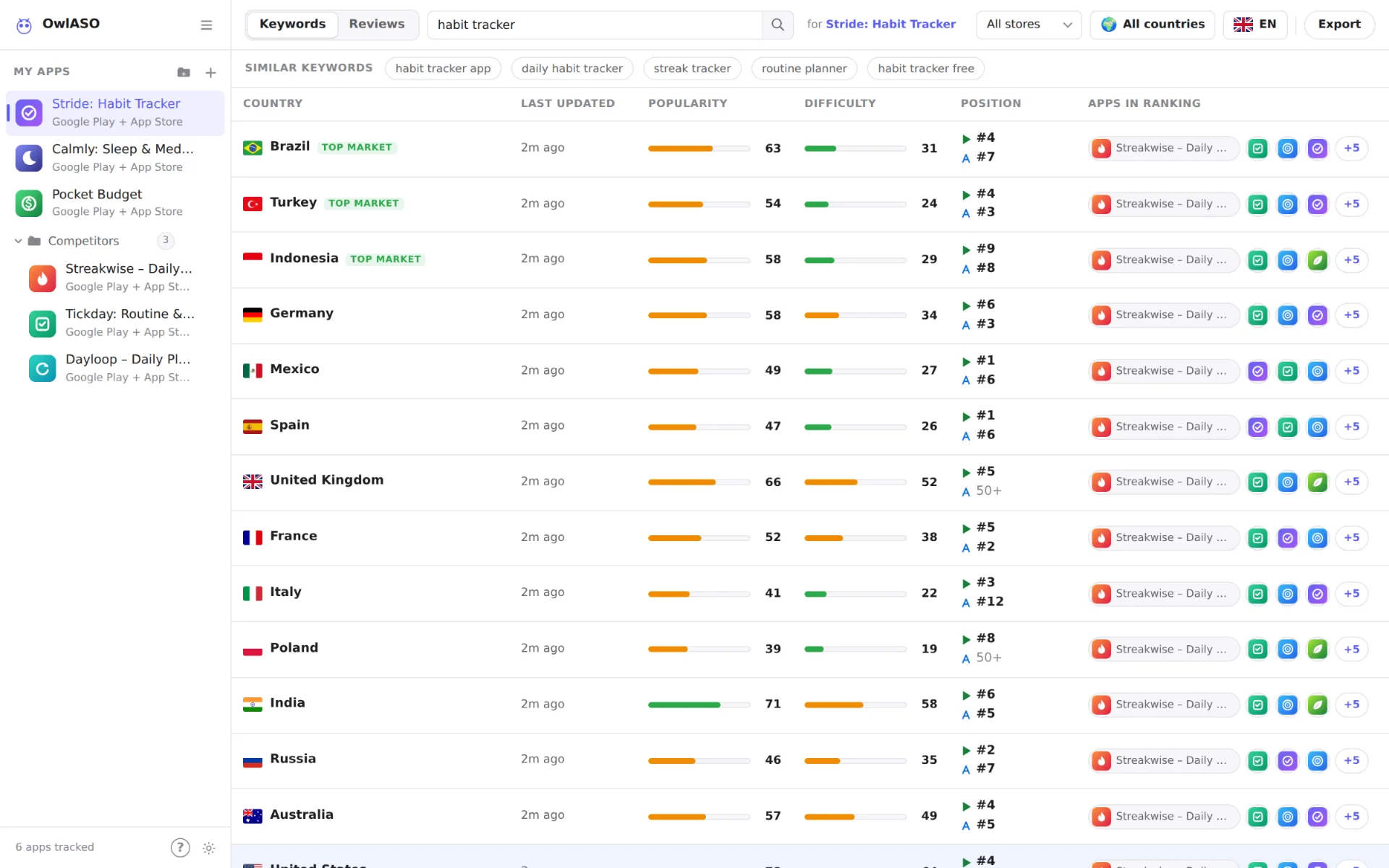
All countries
Pick All countries in the country picker to compare markets instead of checking them one by one.
Keywords
- The keyword is analyzed in all 20 storefronts (3 at a time), one row per country.
- When every country is in, rows are sorted by opportunity. The best 3 get a top market badge.
- Each country’s result is saved to that country’s daily history.
- Click a row, then Open in <country>, for the full analysis there: trend, similar-keyword scores and competitor keywords.
Reviews and Full data
- App Store — every storefront is read, because Apple keeps reviews per country.
- Google Play — one fetch per language, because Google keeps reviews per language, not per country.
- Duplicates are removed and every review is tagged with its storefront or language. CSV exports get a
countrycolumn.
Rank tracking
Position is where your selected app appears in a store’s search results for the keyword. OwlASO reads the top 50 results on each store, so Google Play and App Store positions are tracked separately.
How history works
- Every full analysis saves a snapshot: popularity, difficulty, opportunity, number of apps, the top app, and the complete ranking order on each store.
- There is one snapshot per day for each keyword × store × country × language. Analyzing again on the same day replaces that day’s snapshot.
- Up to 180 daily snapshots are kept per keyword.
- Because the whole ranking order is stored, an app you add later still gets its past positions.
- Keyword details chart popularity, difficulty and your app’s best rank over time (lower is better).
OwlASO doesn’t run on a schedule. History grows when you analyze a keyword, so re-check your keywords regularly.
Where history is stored
- Desktop app — a
rank-historyfolder inside the app’s user-data folder (under%APPDATA%on Windows,~/Library/Application Supporton macOS,~/.configon Linux). - Web mode —
data/rank-history/in the project folder. - Change the location with
RANK_HISTORY_DIRor turn history off withDISABLE_RANK_HISTORY=1(see Configuration).
Reviews
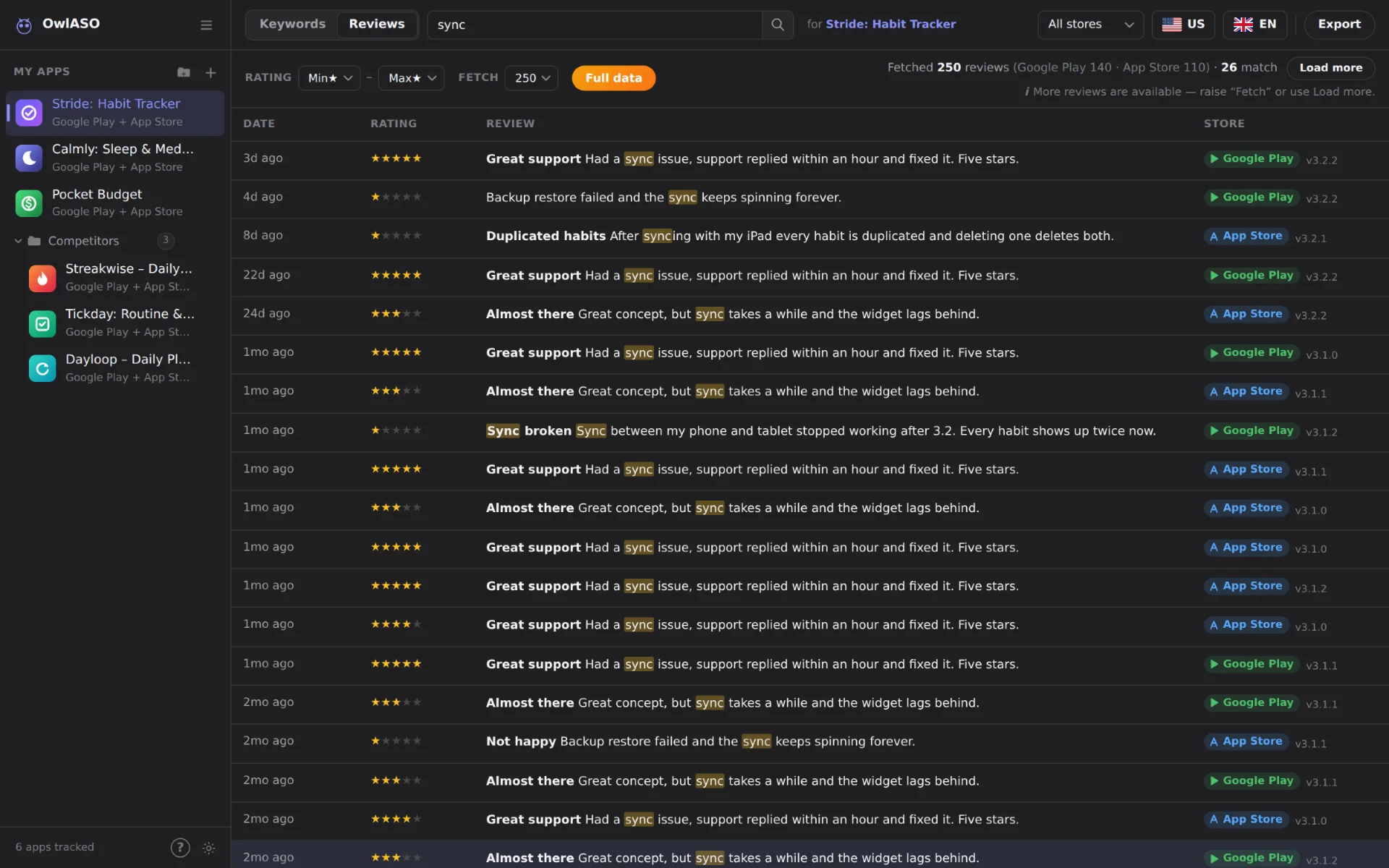
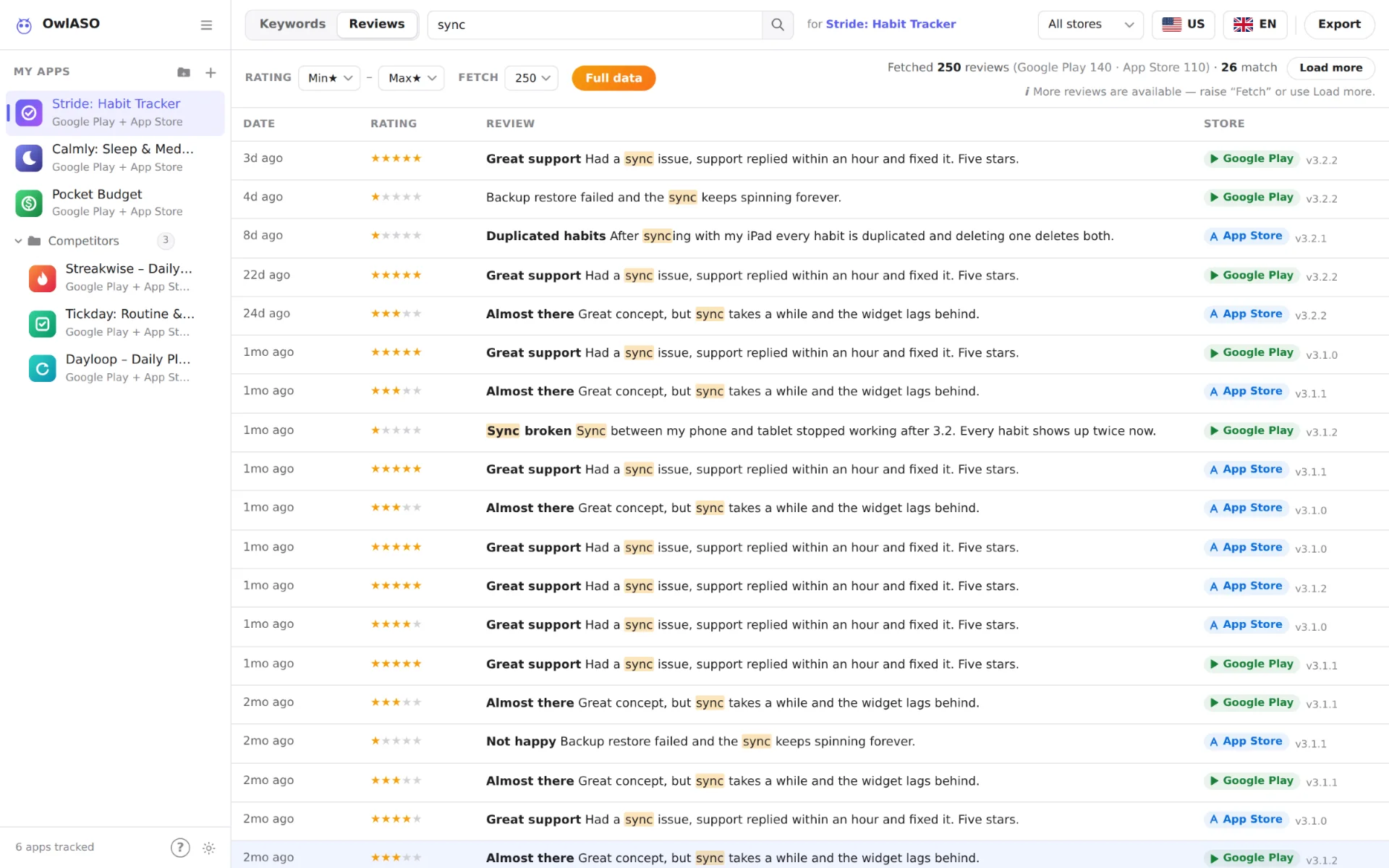
Open the Reviews tab and select an app in the sidebar. Reviews from both stores land in one table — Date, Rating, Review and Store, plus App when you compare apps.
Instant filters
These run locally on the reviews already loaded, so results update as you type:
- Words — every word you type must appear in the review. Matches are highlighted.
- Rating — a minimum and maximum star value.
Fetch settings
Changing any of these loads new data from the stores:
- Store — All stores, Google Play or App Store.
- Country — one of 20 storefronts, or All countries.
- Language — one of 16 languages, or All langs to merge several. Apple’s review feed is per storefront, not per language.
- Fetch — 250, 500, 1K, 2K or 5K reviews per store. Load more raises it one step.
The summary bar shows how many reviews each store returned, store-side limits, and any warnings. Duplicate reviews are removed by their store review id.
Compare apps
Ctrl/⌘-click up to 5 apps in the sidebar. Their reviews are merged, newest first, with an App column.
Read a review
Click any review to open it in full. Use ← / → to step through the list and Esc to close.
Full data
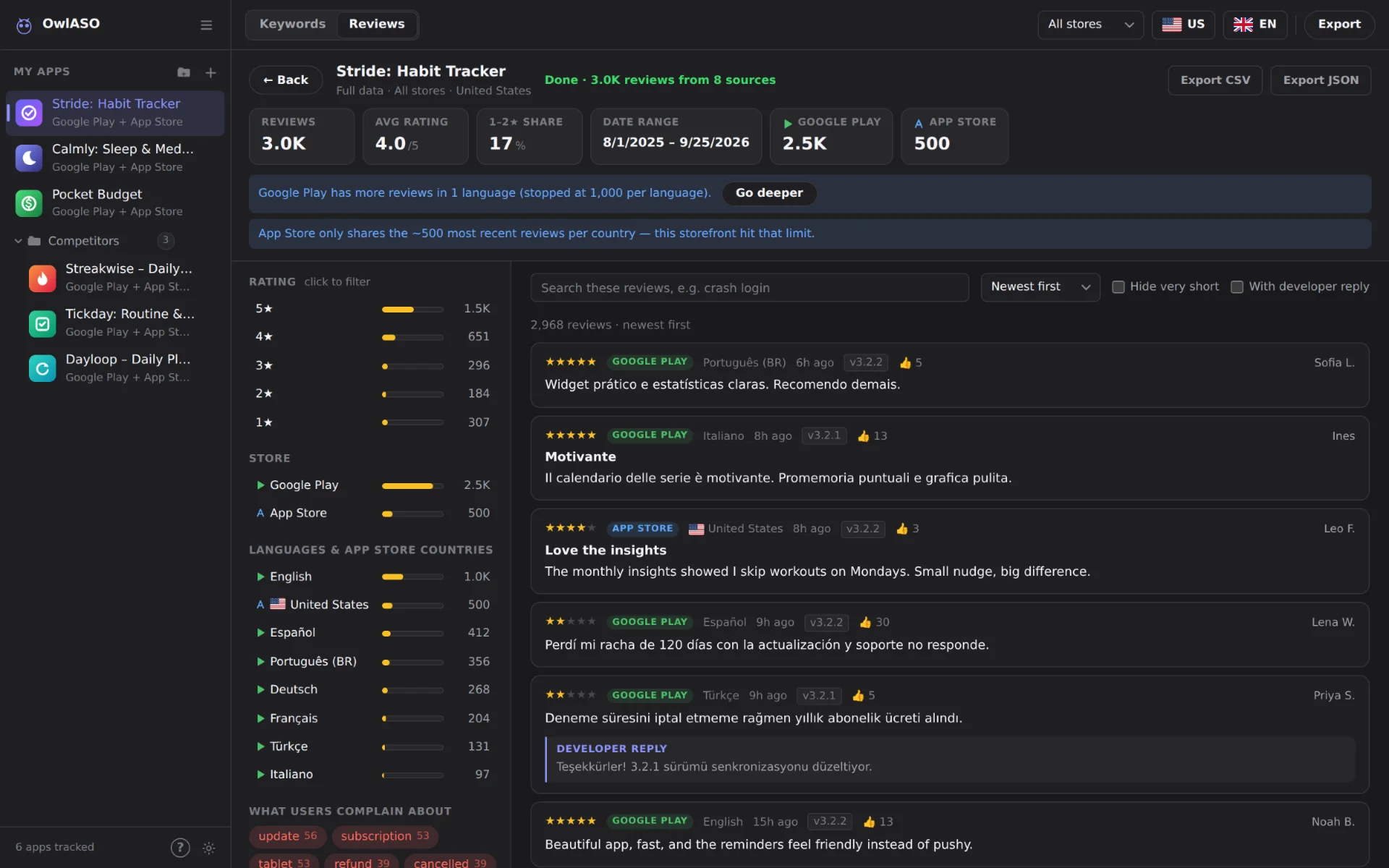
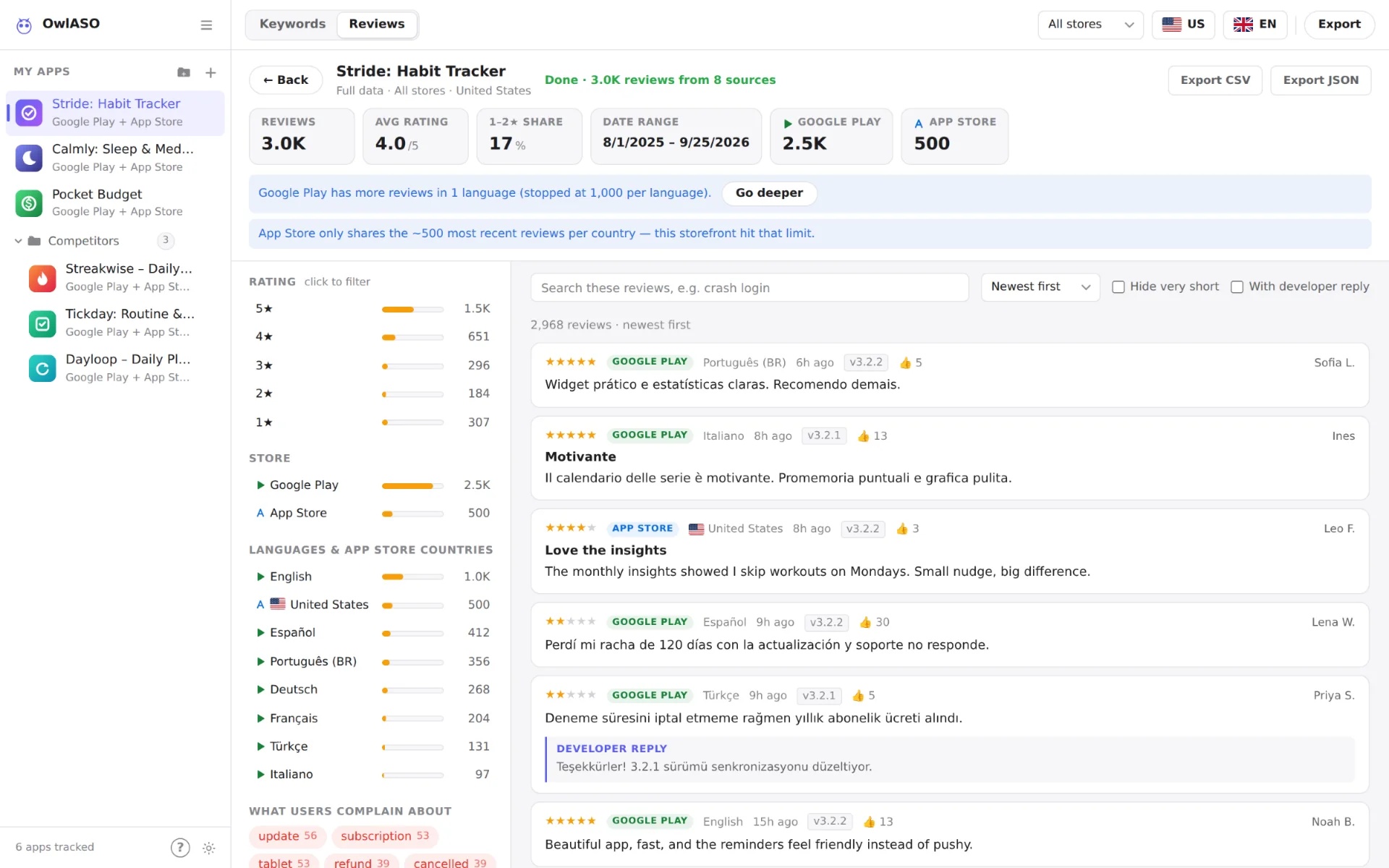
Full data (in the Reviews filter bar) reads every reachable review for the selected app — both stores and every supported language for the storefront, or every storefront with All countries — and opens it in an explorer.
While it loads
- A progress bar tracks each source (a store × language, or an App Store country). Reviews appear as sources finish.
- Stop ends the fetch early and keeps what has loaded.
- The Sources list shows which sources worked, failed, or have more reviews available.
Explore
- Summary cards — review count, average rating, share of 1–2★ reviews, date range, and a count per store.
- Facets — click a star bar, a store or a language (App Store country with All countries) to filter. Active filters show as removable chips.
- What users complain about / love — words that appear far more often in 1–2★ reviews than in 4–5★ ones, and the other way round. Generic praise words and the app’s own name are left out.
- Search & sort — instant search with highlighting; sort by newest, oldest, lowest or highest rating, most helpful, or longest.
- Hide very short reviews (under 20 characters), or show only reviews with a developer reply.
- Click a review to read it in full.
Go deeper
When Google Play has more reviews than were read, Go deeper fetches again with a higher per-language limit and keeps your filters.
| Level | Google Play per language | Total per run |
|---|---|---|
| Default | 1,000 | 20,000 |
| Go deeper | 2,500 | 30,000 |
| Go deeper again | 5,000 | 40,000 |
The App Store stops at about 500 reviews per storefront. That’s Apple’s limit, and OwlASO tells you when a storefront hits it.
Export CSV downloads exactly the filtered list; Export JSON downloads the complete structured result.
Export
Press Ctrl/⌘+E or click Export to download what you’re looking at. Exports respect your current filters.
| View | File | Columns |
|---|---|---|
| Keywords | keywords-<keyword>.csv | keyword, type (analyzed / similar), popularity, difficulty, opportunity, ratings, avgRating, adsPercent, app, googleRank, appleRank, topApps, store, country, analyzedAt |
| Reviews | reviews-<app>.csv | app, platform, appId, country, lang, rating, title, text, author, date, version, helpful, replyText, url |
| Full data | full-data-<app>-reviews.csvfull-data-<app>.json | The filtered reviews with the same columns (CSV), or the complete structured result (JSON) |
- Excel-friendly — CSV files are UTF-8 with a byte-order mark, so non-Latin text opens correctly.
- Formula-injection safe — cells that start with
=,+,-,@, a tab or a carriage return are prefixed with', so review text can never run as a spreadsheet formula.
Guided tour & tips
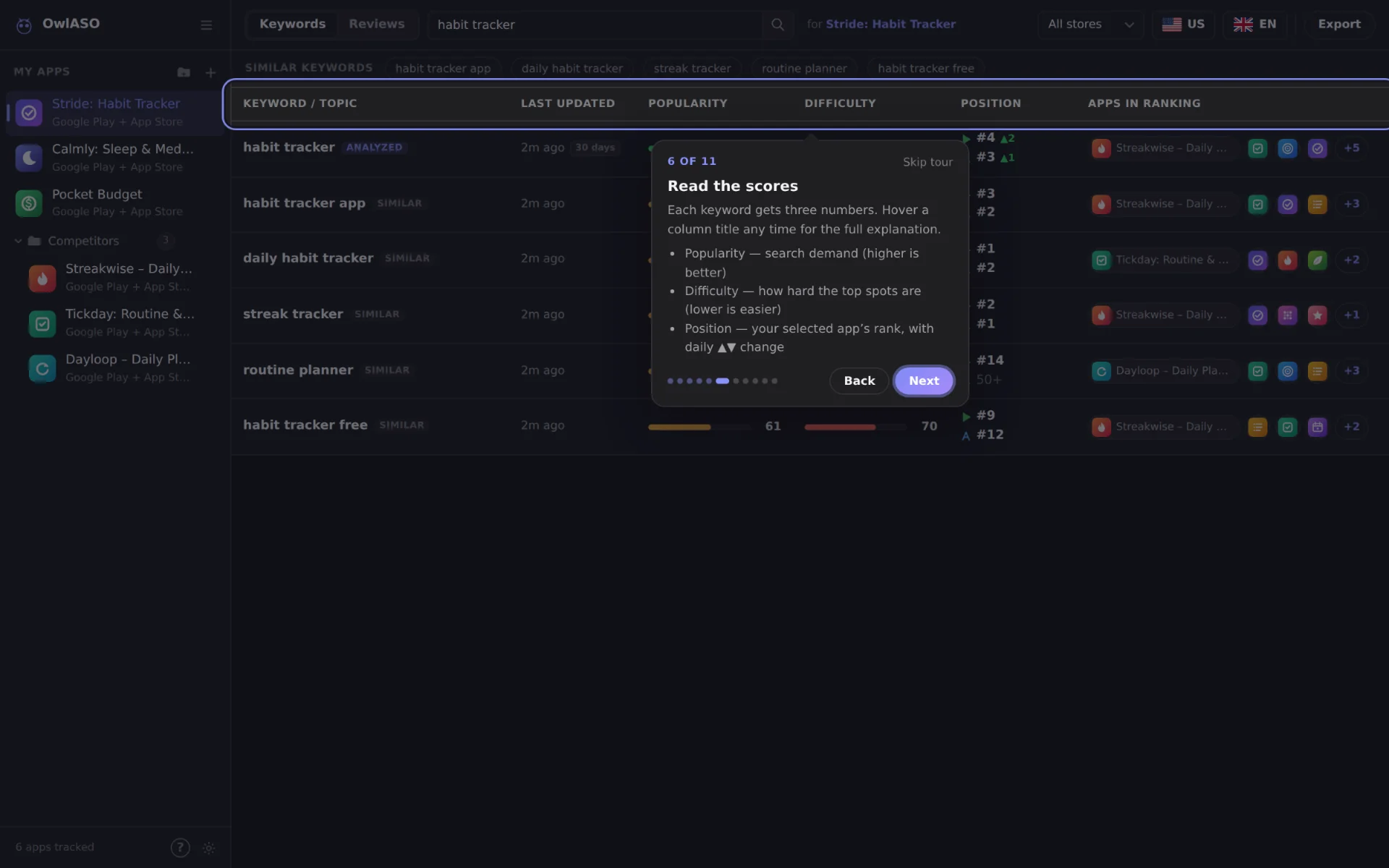
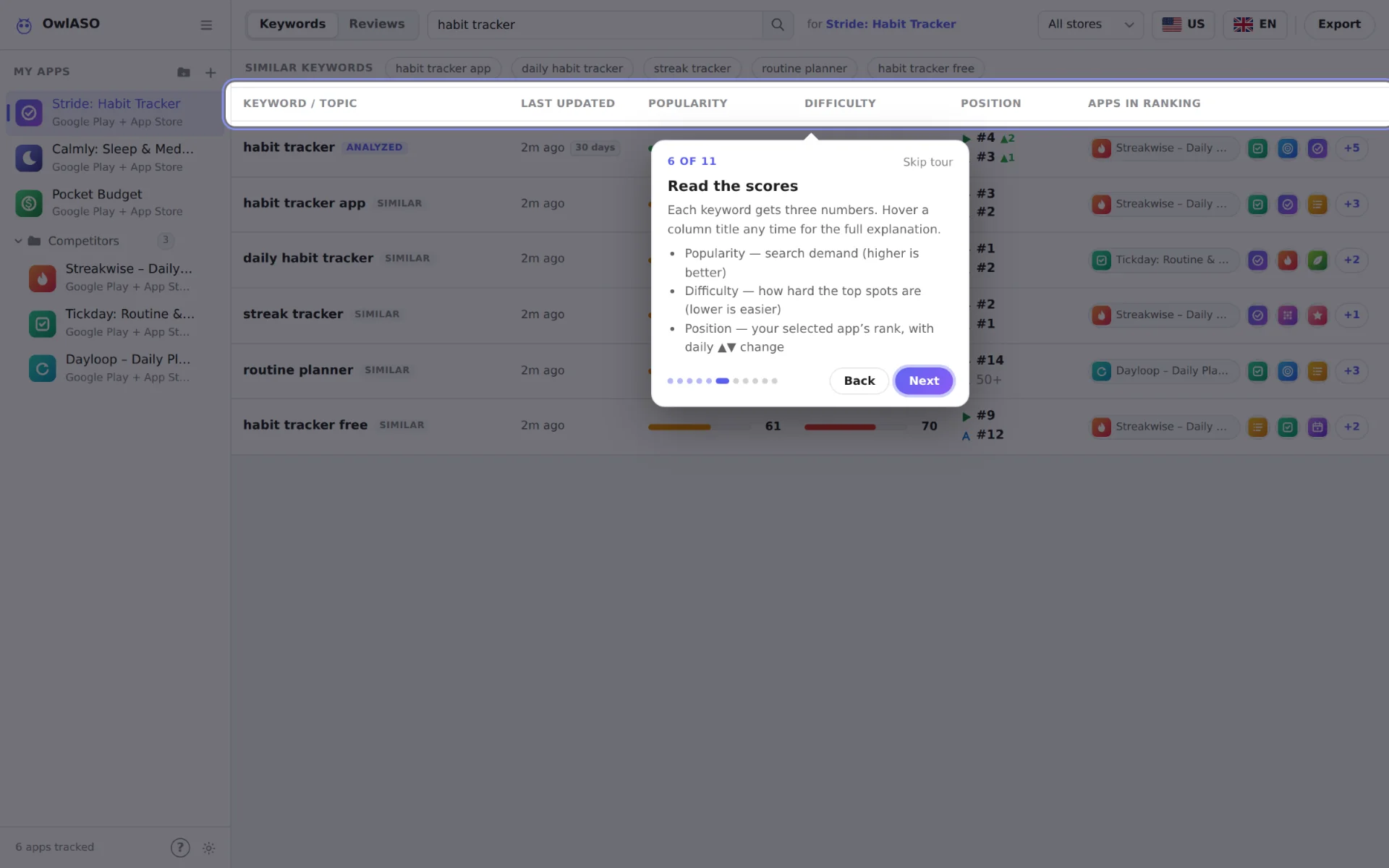
- Guided tour — an 11-step walkthrough of every part of the app. It’s offered on first launch; replay it with ?, the ? button in the sidebar, or Settings. Use ← → to move and Esc to leave.
- Help tooltips — hover or keyboard-focus any control or column title to see what it does, how to read it, and its shortcut.
- Tips — the first time you reach a feature, a small tip points at the next useful step. Each shows once; turn tips off or bring them back in Settings.
Keyboard shortcuts
| Keys | Action |
|---|---|
| ? | Start the guided tour |
| / | Focus search |
| A | Add app |
| Enter | Analyze keyword / apply review filter |
| Ctrl/⌘ + E | Export CSV |
| Ctrl/⌘ + click | Select up to 5 apps to compare |
| ← → | Previous / next review (in the review dialog) |
| Delete / Backspace | Remove the focused app (undo available) |
| Esc | Close dialog |
Settings & data
Open Settings from the gear icon at the bottom of the sidebar.
- Appearance — Light, Dark or System (follows your OS).
- Help & tips — start the guided tour, turn tips on or off, or show all tips again.
- Reset app data — removes tracked apps, folders and preferences from this device. Keyword rank history is kept.
- Meta Ads Library — marked “coming soon” in the UI. Advanced users can already enable ad signals with the
FB_ADLIB_ACCESS_TOKENenvironment variable.
Metrics
For each analysis, OwlASO searches the chosen store(s), loads details for up to 8 top results per store, merges the same app across stores, and keeps up to 15 apps. All scores are computed over those apps and clamped to 0–100.
Inputs
| Symbol | Meaning |
|---|---|
n | Number of ranking apps analyzed (max 15) |
R | Total number of ratings across those apps |
avg | Average star rating of the rated apps (unrated listings are ignored) |
ads | Share of apps showing ads — Google Play’s contains ads flag, or active Meta ads when configured |
authority | Share of apps with at least 50,000 ratings |
strong | Share of apps rated 4.0★ or higher |
Formulas
popularity  = 22 × min(1, n / 12)
            + 40 × min(1, log10(1 + R) / 8)
            + 20 × (avg − 1) / 4
            + 18 × ads

difficulty  = 40 × authority
            + 25 × ads
            + 15 × strong
            + 20 × min(1, n / 20)

opportunity = popularity × (100 − difficulty) / 100
Reading the scores
| Pattern | What it usually means |
|---|---|
| High popularity, low difficulty | The sweet spot — high opportunity. |
| High popularity, high difficulty | Big, established apps dominate. Try longer, more specific variants. |
| Low popularity, low difficulty | A niche: easy to win, but little traffic. |
Similar keywords
Suggestions come from three places, in order: 2–3-word phrases in the ranking apps’ titles that contain your keyword; modifiers in front (best, free, simple…); and suffixes behind (app, tracker, planner…).
Competitor keywords
OwlASO runs up to 10 probe searches on each selected store — your keyword, the first similar keywords, free / best / top / new + keyword, and keyword + the current year. For the top 5 apps it records which probes they appear for within the top 20 results.
Data sources & limits
| App Store | Google Play | |
|---|---|---|
| Search & details | iTunes Search & Lookup API | google-play-scraper, HTML fallback |
| Reviews | Customer-reviews RSS feed | google-play-scraper |
| Reviews per page | 50 | 150 |
| Maximum | ≈ 500 per storefront (10 pages); one feed per storefront | 5,000 per fetch; 1,000 per language in Full data (up to 5,000 with Go deeper) |
| Sort orders | Newest, most helpful | Newest, rating, helpfulness |
Google Play has no official public reviews API. Layout changes on Google’s side can break the scraper, and Google may throttle heavy use.
Staying polite
- Caching — searches and reviews for 5 minutes, app details for 15 minutes, in a size-bounded cache.
- Request coalescing — identical requests in flight are sent once.
- Retries — up to 2 retries with backoff on 408, 425, 429 and 5xx responses, honouring
Retry-After. Each request times out after 15 seconds.
Very large batches can get you throttled for a while. Spread big jobs out.
Privacy & security
Your data
- Tracked apps, folders, preferences and recent keywords live in the app’s local storage on your device.
- Rank history is saved as JSON files (see where).
- There is no OwlASO server, no account and no analytics.
Outbound connections
| Host | Why |
|---|---|
itunes.apple.com | App Store search, lookup and reviews |
play.google.com | Google Play search, details and reviews |
| Store image CDNs | App icons |
flagcdn.com | Country flag icons in the pickers |
graph.facebook.com | Only when FB_ADLIB_ACCESS_TOKEN is set |
Web mode
- Binds to
127.0.0.1by default. - Only
localhost, IP literals andALLOWED_HOSTSare accepted in theHostheader, which blocks DNS-rebinding attacks. /api/*refuses cross-site browser requests (Sec-Fetch-Site/Originchecks), which blocks CSRF from other websites.GET/HEADonly; strict Content-Security-Policy with no inline scripts,nosniff,frame-ancestors 'none'and same-origin COOP/CORP.- Static files are resolved with path-traversal checks.
Desktop app
- Sandboxed renderer with context isolation, Node integration off and no
<webview>. - The UI loads from a private
app://scheme and the API runs in the main process — no network port is opened. - Navigation away from the app is blocked; only
http(s)links open externally, in your browser. - Every permission request (camera, microphone, notifications…) is denied.
Files & exports
- Rank-history file names come from a SHA-256 hash of the query, so request parameters can never choose the file path.
- CSV exports neutralise formula injection (see Export).
With HOST=0.0.0.0, anyone who can reach the port can trigger store traffic and write history files. Only do this on a network you trust.
Found a vulnerability? Please report it privately through a GitHub Security Advisory rather than a public issue. Version 1.6.x is supported.
Configuration
OwlASO is configured with environment variables. PORT, HOST and ALLOWED_HOSTS apply to web mode; the rest also apply to the desktop app when you start it from a terminal.
| Variable | Default | Purpose |
|---|---|---|
PORT | 3000 | Web server port |
HOST | 127.0.0.1 | Bind address |
ALLOWED_HOSTS | — | Comma-separated extra hostnames accepted in the Host header |
RANK_HISTORY_DIR | data/rank-history (desktop: user-data folder) | Where keyword history is stored |
DISABLE_RANK_HISTORY | — | 1 disables history |
SEARCH_CACHE_TTL_MS | 300000 (5 min) | Search cache lifetime |
REVIEW_CACHE_TTL_MS | 300000 (5 min) | Review cache lifetime |
DETAILS_CACHE_TTL_MS | 900000 (15 min) | App-details cache lifetime |
CACHE_MAX_WEIGHT | 100000 | Cache size bound (≈ number of cached rows) |
DISABLE_CACHE | — | 1 disables caching |
MOCK_STORE_DATA | — | 1 serves built-in demo data (no network) |
FB_ADLIB_ACCESS_TOKEN | — | Optional Meta Ad Library token for ad signals |
PORT=3001 npm start                          # another port
MOCK_STORE_DATA=1 npm start                  # offline demo data
HOST=0.0.0.0 ALLOWED_HOSTS=owlaso.lan npm start  # trusted LAN only
On Windows PowerShell, set variables first: $env:PORT = "3001"; npm start.
HTTP API
Web mode exposes a small, read-only JSON API on the same port (default http://localhost:3000). The desktop app uses the same router internally, without opening a port.
- Every endpoint is
GETand returns JSON unless noted. - Invalid input returns
400with{"error": "…"}; unknown routes return404. countryis a 2-letter storefront (defaultus);langdefaults to the storefront’s main language.- Browser requests from other websites are refused (
403). curl, scripts and same-origin pages work.
Endpoints
| Endpoint | Parameters |
|---|---|
/api/health | — returns ok, version, mock, time |
/api/search | q, platform=all|google|apple, country, lang, limit |
/api/asosearch | q (2–100 chars), store=both|google|apple, country (one storefront; all returns 400), lang, lite=1 (skip competitor probes and history), track=1 (keep history for a lite run) |
/api/asosearch/history | q, store, country, lang → daily snapshots with per-store rankings |
/api/app-details | appId, platform, appId2, store=both, country, lang |
/api/reviews | appId, platform=google|apple|both, appPlatform, appId2, title, developer, country (all = every storefront), lang, max, sort, plus filters |
/api/reviews.csv | Same as /api/reviews; CSV download |
/api/reviews.full.stream | appId, platform, appPlatform, appId2, title, country (all = every storefront), depth=1|2|3 (Go deeper) → NDJSON stream |
/api/reviews.full | Same, as one JSON document |
Fetching both stores
appPlatform says which store appId belongs to; it’s inferred from the id format when omitted (digits = App Store, package name = Google Play). With platform=both, pass the other store’s id as appId2. Without it, OwlASO looks the counterpart up by title (+ developer) and only accepts a confident match.
Review parameters & filters
| Parameter | Meaning |
|---|---|
max | Reviews per store, 1–5000 (default 200) |
sort | newest (default), rating, helpfulness |
lang=all | Merge several languages (languages = comma list, maxLanguages default 6) |
stars | Exact star values, e.g. 1,2 |
minRating / maxRating | Inclusive star range |
allKeywords | Every word must appear |
anyKeyword | At least one word must appear |
keyword | The exact phrase must appear |
dateFrom / dateTo | ISO dates; a bare YYYY-MM-DD for dateTo includes that whole day (UTC) |
version | App version contains this text |
minLength | Minimum review text length |
replyOnly=true | Only reviews with a developer reply |
Text filters match the review title, text, author and version, case-insensitively.
Examples
# Health check
curl -s http://localhost:3000/api/health

# Score a keyword on both stores (US)
curl -s 'http://localhost:3000/api/asosearch?q=habit%20tracker&store=both&country=us'

# 1–2★ Spotify reviews mentioning "crash", both stores
curl -s 'http://localhost:3000/api/reviews?appId=com.spotify.music&appId2=324684580&platform=both&maxRating=2&allKeywords=crash&max=500'

# Same, as a CSV file
curl -s -o reviews.csv 'http://localhost:3000/api/reviews.csv?appId=com.spotify.music&appId2=324684580&platform=both&maxRating=2'

# Stream every reachable review (NDJSON)
curl -sN 'http://localhost:3000/api/reviews.full.stream?appId=324684580&appId2=com.spotify.music&platform=both&country=us'
Responses
/api/reviews returns reviews, totalFetched, totalAfterFilters and a meta object (sources, errors, warnings, notes, moreAvailable). Each review looks like this:
{
  "id": "…",
  "platform": "google",
  "appId": "com.spotify.music",
  "rating": 2,
  "title": "",
  "text": "Crashes every time I open a playlist",
  "author": "…",
  "date": "2026-09-20T10:15:00.000Z",
  "version": "9.0.62",
  "helpful": 3,
  "replyText": "",
  "url": "https://play.google.com/store/apps/details?id=…"
}
/api/asosearch returns the keyword, similar keywords, competitorKeywords, the ranking apps (with per-store listings), rankings (app ids in search order per store), metrics (popularity, difficulty, opportunity and their inputs), plus errors and warnings.
The stream sends one JSON object per line: a plan line listing the sources it will read, then a group line (reviews, count, stars, avgRating, topTerms) and a progress line as each source finishes, and finally a done line with the totals — or an error line.
{"type":"plan","total":8,"depth":1,"sources":[…]}
{"type":"group","group":{"platform":"google","lang":"en","count":1000,…}}
{"type":"progress","done":1,"total":8,"source":{"status":"ok","count":1000,…}}
…
{"type":"done","totalGroups":8,"totalReviews":2968,"perStore":{…},…}
Development
npm test              # unit + integration tests (no network)
npm run smoke:mock    # boots the server with demo data and hits every route
npm run smoke:live    # real Apple/Google calls: needs internet, may be throttled
Project layout
| Path | What’s inside |
|---|---|
src/server.js | Web server: static files, security headers, host and cross-site checks |
src/api.js | API router shared by the web server and the desktop app |
src/providers.js | Store clients: search, details, reviews, caching, retries |
src/aso.js | Keyword analysis, metrics, similar & competitor keywords, rank history |
src/filters.js | Review filters |
src/ads.js | Optional Meta Ad Library signals |
electron/ | Desktop shell: app:// protocol, window, hardening, preload bridge |
public/ | The UI: index.html, app.js, styles.css |
test/ | node:test suites and smoke scripts |
Issues and pull requests are welcome on GitHub.
Troubleshooting
- “Port 3000 is already in use”
- Another program is using the port. Start on a different one:
PORT=3001 npm start. 403 Forbidden host- You opened web mode through a hostname other than
localhostor an IP address. Add the name toALLOWED_HOSTS. - “Cross-site requests are not allowed.”
- A page on another origin called the API. Call it from the OwlASO page itself, or from curl or a script.
- Google Play returns errors or no results
- Google may be throttling you, or its page layout changed. Wait a few minutes and retry.
npm run smoke:livechecks both stores; a newer OwlASO release may include a fix. - Only about 500 App Store reviews
- That’s Apple’s cap per storefront. Switch the country, or pick All countries to read every storefront at once.
- “Keyword analysis runs per country” (API)
/api/asosearchtakes one storefront. To compare countries, call it once per country, as the app does.- No trend arrows or chart
- History needs analyses on at least two different days for the same keyword, store, country and language.
- Position shows
50+ - The selected app isn’t in the top 50 results for that keyword on that store. Make sure the right app is selected in the sidebar.
npm installfails or warns about the engine- OwlASO needs Node.js 22.12 or newer. Check with
node -v. - The Linux AppImage won’t start
- Make it executable (
chmod +x OwlASO-*.AppImage). Some distributions also need FUSE 2 (for example thelibfuse2package).
Still stuck? Open an issue with your OS, OwlASO version and the error message.
Changelog
Unreleased on main · run from source
- All countries — analyze a keyword in all 20 storefronts, sorted by opportunity with “top market” badges; reviews and Full data read every App Store storefront plus every Google Play language, and CSV exports gain a
countrycolumn. - Full data explorer — live progress per source with Stop, click-to-filter facets, search, six sort orders, complaint and praise terms, summary cards, and Go deeper (up to 5,000 Google Play reviews per language).
- Guidance — 11-step guided tour (?), rich help tooltips on every control and column, and one-time contextual tips.
- Keyword table — the top ranking app keeps its name, the rest are icon chips, so long titles no longer squeeze the column.
1.6.0-beta.1 September 2026
- Security — fixed a path traversal in rank-history writes, a crash on malformed
Hostheaders, CSRF / DNS-rebinding exposure of the local API, CSV formula injection and a broken CSV quote in full-data exports. Added a CSP and security headers, Electron sandboxing, navigation and permission lockdown, and anhttp(s)-only external-link allowlist. Upgraded Electron 31 → 44 and electron-builder 24 → 26. - Correctness — “All stores” really fetches both stores; the Add-app dialog searches both stores; ranks follow real search order; Position is your app’s rank instead of an average; history is keyed by country and language, one snapshot per day, and works for non-Latin keywords; counterpart matching no longer falls back to unrelated apps; unrated listings no longer drag ratings down; duplicate reviews are removed.
- Performance — a shared, size-bounded cache with request coalescing, far fewer store requests per keyword analysis, and instant local review filtering.
- UX — Keywords/Reviews tabs with a contextual filter bar, store column and match highlighting, multi-app comparison, ←/→ review navigation, toasts with undo, keyboard and screen-reader support, trend charts, better empty and error states, no dark-mode flash, native Edit menu on macOS.
- Desktop — first packaged Windows installer (NSIS, x64).